
Anasoft Scheduler PE2.7 - Download
You'll be able to download in few seconds.
Publisher Description
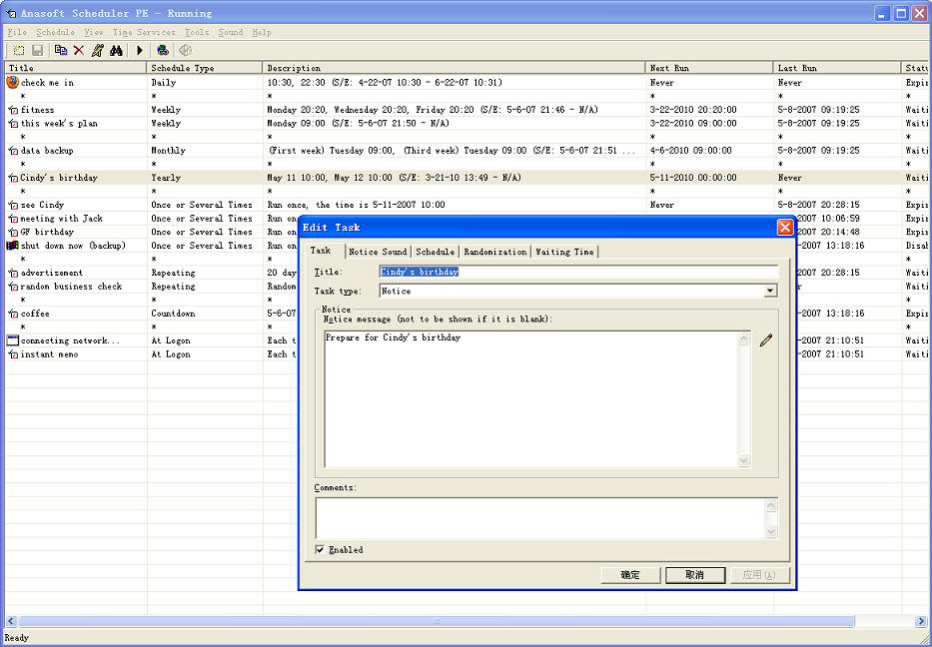
Anasoft Scheduler PE is a strong and user-friendly personal scheduling tool. By applying different scheduling methods directly or combining them in a suitable way, it can help you arrange your daily plans in life and work neatly.
Tasks to Schedule:
1) Running a program, opening a file, visiting a web site, sending an email, or browsing for something in the file system.
2) Notice (text message + music, sound).
3) Special Windows operations (standby, hibernation, shutdown, reboot and logoff).
Basic Scheduling Types:
1) Daily, 2) Weekly, 3) Monthly, 4) Yearly, 5) Once or several times, 6) Repeating, 7) Count down, 8) At logon.
Randomization:
With this optional function, you can add uncertainty you may be interested in to an existing schedule.
Other Features:
1) Clock synchronization.
2) Optional music or sound during event noticing.
3) Optional waiting time in case your computer is not running when the time of your scheduled task is due.
4) Optional password protection for your private scheduling from being read or modified by any other people.
5) Schedule statistics.
6) Event log.
Welcome to use it and enjoy a happy life!
About Anasoft Scheduler PE
This Project Management program is available in English, Chinese, ChineseSimplified, ChineseTraditional. It was last updated on 29 September, 2026. Anasoft Scheduler PE is compatible with the following operating systems: Windows.
The company that develops Anasoft Scheduler PE is Anasoft Studio. The latest version released by its developer is 2.7.
The download we have available for Anasoft Scheduler PE has a file size of 1.0 MB. Just click the green Download button above to start the downloading process. The program is listed on our website since 2014-01-01 and was downloaded 0 times. We have already checked if the download link is safe, however for your own protection we recommend that you scan the downloaded software with your antivirus. Your antivirus may detect the Anasoft Scheduler PE as malware if the download link is broken.
How to install Anasoft Scheduler PE on your Windows device:
- Click on the Download button on our website. This will start the download from the website of the developer.
- Once the Anasoft Scheduler PE is downloaded click on it to start the setup process (assuming you are on a desktop computer).
- When the installation is finished you should be able to see and run the program.
Program Details
General
System requirements
Download information
Pricing
Version History
version 2.7
posted on 2014-01-01
Fixed a bug when adding new task - the first existing task was sometimes converted to the new one; installation package: Unicode encoding is employed for better compatibility.
version 2.2.1
posted on
Fixed a bug that a countdown schedule may crash under certain situation.
Disclaimer
External Download
We do not host Anasoft Scheduler PE on our servers. We did not scan it for viruses, adware, spyware or other type of malware. This app is hosted by the software publisher and passed their terms and conditions to be listed there. We recommend caution when installing it.
The external download link for Anasoft Scheduler PE is provided to you by apps112.com without any warranties, representations or guarantees of any kind, so access it at your own risk.
If you have questions regarding this particular app contact the publisher directly. For questions about the functionalities of apps112.com contact us.
